The same plot in 14 other libraries — Python: Altair, lets-plot, Matplotlib, Plotly, plotnine, Pygal, Seaborn; R: ggplot2; Julia: Makie.jl; JavaScript: Chart.js, D3.js, Apache ECharts, Highcharts, MUI X Charts. Compare all 15 side by side: Code 128 Barcode in Python, R, Julia and JavaScript.
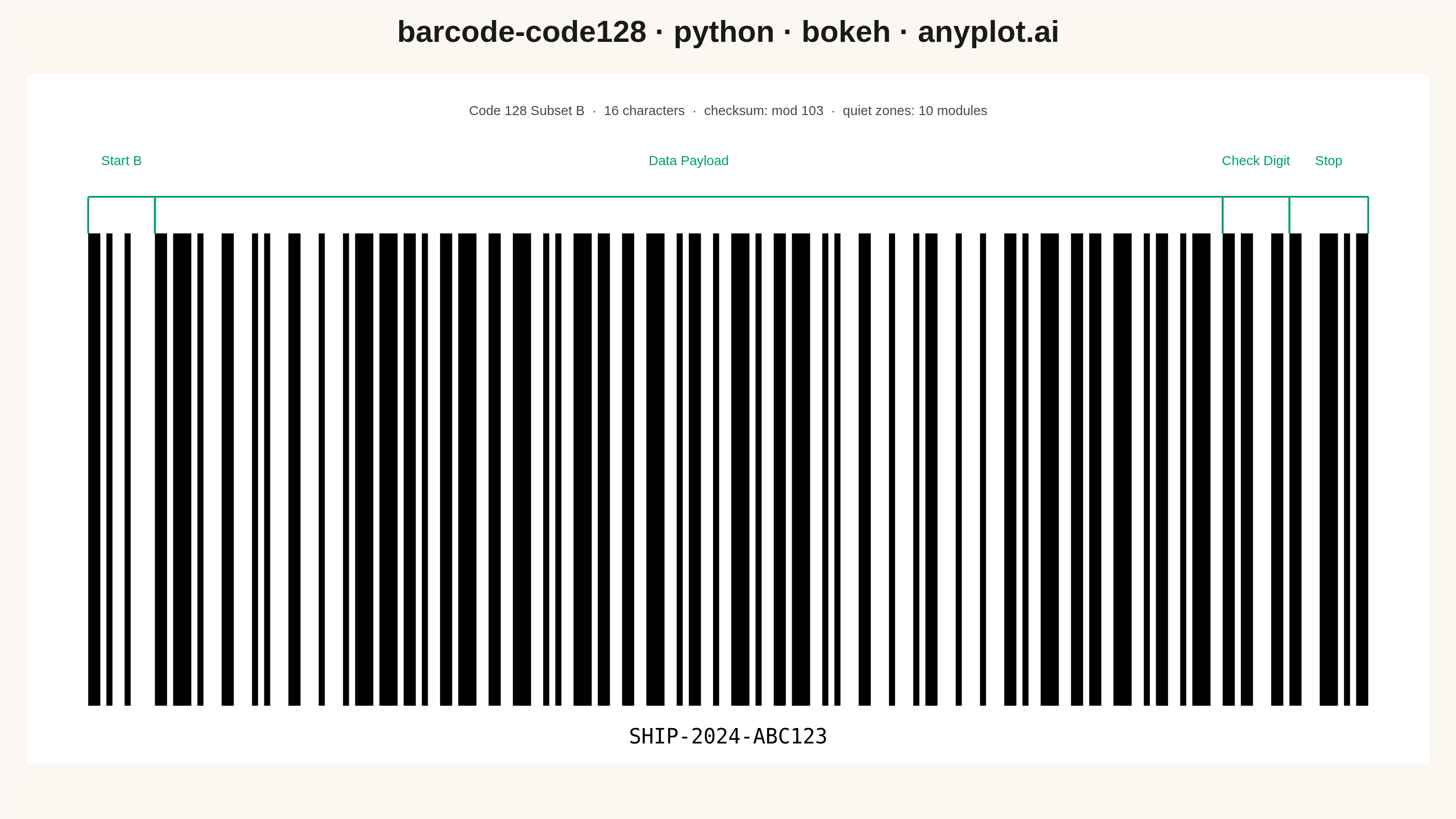
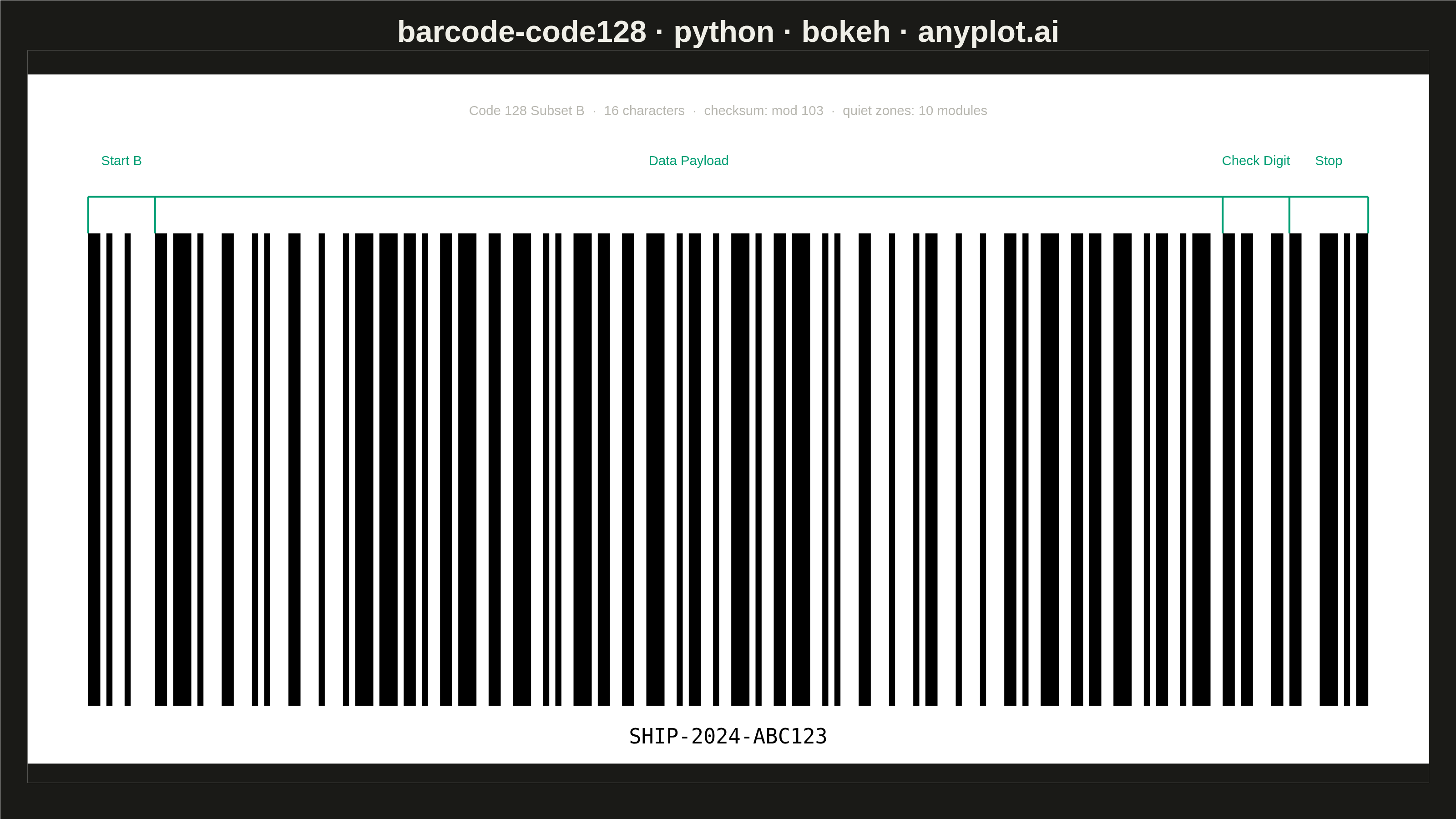
A Code 128 barcode visualization that encodes alphanumeric data into a high-density linear barcode pattern. Code 128 is a widely-used 1D barcode format that supports the full 128 ASCII character set, with three code subsets (A, B, C) that can be switched dynamically for optimal encoding efficiency. This visualization generates scannable barcodes commonly found on shipping labels, industrial parts, and healthcare specimens.
""" anyplot.ai
barcode-code128: Code 128 Barcode
Library: bokeh 3.9.0 | Python 3.13.13
Quality: 88/100 | Updated: 2026-05-21
"""

import os
import sys
import time
from pathlib import Path


# Remove this script's own directory from sys.path so the installed
# bokeh package is found instead of this file (which is also named bokeh.py).
_own_dir = os.path.dirname(os.path.realpath(__file__))
sys.path = [p for p in sys.path if os.path.realpath(p or ".") != _own_dir]

import base64

from bokeh.embed import file_html
from bokeh.models import ColumnDataSource, HoverTool, Label
from bokeh.plotting import figure
from bokeh.resources import INLINE
from selenium import webdriver
from selenium.webdriver.chrome.options import Options


# Theme tokens
THEME = os.getenv("ANYPLOT_THEME", "light")
PAGE_BG = "#FAF8F1" if THEME == "light" else "#1A1A17"
INK = "#1A1A17" if THEME == "light" else "#F0EFE8"
INK_SOFT = "#4A4A44" if THEME == "light" else "#B8B7B0"
ACCENT = "#009E73"  # Okabe-Ito green for structural zone annotations

# Code 128 B subset encoding (bar widths per character, 6 elements each)
CODE128_B = {
    " ": [2, 1, 2, 2, 2, 2],
    "!": [2, 2, 2, 1, 2, 2],
    '"': [2, 2, 2, 2, 2, 1],
    "#": [1, 2, 1, 2, 2, 3],
    "$": [1, 2, 1, 3, 2, 2],
    "%": [1, 3, 1, 2, 2, 2],
    "&": [1, 2, 2, 2, 1, 3],
    "'": [1, 2, 2, 3, 1, 2],
    "(": [1, 3, 2, 2, 1, 2],
    ")": [2, 2, 1, 2, 1, 3],
    "*": [2, 2, 1, 3, 1, 2],
    "+": [2, 3, 1, 2, 1, 2],
    ",": [1, 1, 2, 2, 3, 2],
    "-": [1, 2, 2, 1, 3, 2],
    ".": [1, 2, 2, 2, 3, 1],
    "/": [1, 1, 3, 2, 2, 2],
    "0": [1, 2, 3, 1, 2, 2],
    "1": [1, 2, 3, 2, 2, 1],
    "2": [2, 2, 3, 2, 1, 1],
    "3": [2, 2, 1, 1, 3, 2],
    "4": [2, 2, 1, 2, 3, 1],
    "5": [2, 1, 3, 2, 1, 2],
    "6": [2, 2, 3, 1, 1, 2],
    "7": [3, 1, 2, 1, 3, 1],
    "8": [3, 1, 1, 2, 2, 2],
    "9": [3, 2, 1, 1, 2, 2],
    ":": [3, 2, 1, 2, 2, 1],
    ";": [3, 1, 2, 2, 1, 2],
    "<": [3, 2, 2, 1, 1, 2],
    "=": [3, 2, 2, 2, 1, 1],
    ">": [2, 1, 2, 1, 2, 3],
    "?": [2, 1, 2, 3, 2, 1],
    "@": [2, 3, 2, 1, 2, 1],
    "A": [1, 1, 1, 3, 2, 3],
    "B": [1, 3, 1, 1, 2, 3],
    "C": [1, 3, 1, 3, 2, 1],
    "D": [1, 1, 2, 3, 1, 3],
    "E": [1, 3, 2, 1, 1, 3],
    "F": [1, 3, 2, 3, 1, 1],
    "G": [2, 1, 1, 3, 1, 3],
    "H": [2, 3, 1, 1, 1, 3],
    "I": [2, 3, 1, 3, 1, 1],
    "J": [1, 1, 2, 1, 3, 3],
    "K": [1, 1, 2, 3, 3, 1],
    "L": [1, 3, 2, 1, 3, 1],
    "M": [1, 1, 3, 1, 2, 3],
    "N": [1, 1, 3, 3, 2, 1],
    "O": [1, 3, 3, 1, 2, 1],
    "P": [3, 1, 3, 1, 2, 1],
    "Q": [2, 1, 1, 3, 3, 1],
    "R": [2, 3, 1, 1, 3, 1],
    "S": [2, 1, 3, 1, 1, 3],
    "T": [2, 1, 3, 3, 1, 1],
    "U": [2, 1, 3, 1, 3, 1],
    "V": [3, 1, 1, 1, 2, 3],
    "W": [3, 1, 1, 3, 2, 1],
    "X": [3, 3, 1, 1, 2, 1],
    "Y": [3, 1, 2, 1, 1, 3],
    "Z": [3, 1, 2, 3, 1, 1],
    "[": [3, 3, 2, 1, 1, 1],
    "\\": [3, 1, 4, 1, 1, 1],
    "]": [2, 2, 1, 4, 1, 1],
    "^": [4, 3, 1, 1, 1, 1],
    "_": [1, 1, 1, 2, 2, 4],
    "`": [1, 1, 1, 4, 2, 2],
    "a": [1, 2, 1, 1, 2, 4],
    "b": [1, 2, 1, 4, 2, 1],
    "c": [1, 4, 1, 1, 2, 2],
    "d": [1, 4, 1, 2, 2, 1],
    "e": [1, 1, 2, 2, 1, 4],
    "f": [1, 1, 2, 4, 1, 2],
    "g": [1, 2, 2, 1, 1, 4],
    "h": [1, 2, 2, 4, 1, 1],
    "i": [1, 4, 2, 1, 1, 2],
    "j": [1, 4, 2, 2, 1, 1],
    "k": [2, 4, 1, 2, 1, 1],
    "l": [2, 2, 1, 1, 1, 4],
    "m": [4, 1, 3, 1, 1, 1],
    "n": [2, 4, 1, 1, 1, 2],
    "o": [1, 3, 4, 1, 1, 1],
    "p": [1, 1, 1, 2, 4, 2],
    "q": [1, 2, 1, 1, 4, 2],
    "r": [1, 2, 1, 2, 4, 1],
    "s": [1, 1, 4, 2, 1, 2],
    "t": [1, 2, 4, 1, 1, 2],
    "u": [1, 2, 4, 2, 1, 1],
    "v": [4, 1, 1, 2, 1, 2],
    "w": [4, 2, 1, 1, 1, 2],
    "x": [4, 2, 1, 2, 1, 1],
    "y": [2, 1, 2, 1, 4, 1],
    "z": [2, 1, 4, 1, 2, 1],
    "{": [4, 1, 2, 1, 2, 1],
    "|": [1, 1, 1, 1, 4, 3],
    "}": [1, 1, 1, 3, 4, 1],
    "~": [1, 3, 1, 1, 4, 1],
}

# Code 128 value lookup for checksum calculation
CODE128_VALUES = {
    " ": 0,
    "!": 1,
    '"': 2,
    "#": 3,
    "$": 4,
    "%": 5,
    "&": 6,
    "'": 7,
    "(": 8,
    ")": 9,
    "*": 10,
    "+": 11,
    ",": 12,
    "-": 13,
    ".": 14,
    "/": 15,
    "0": 16,
    "1": 17,
    "2": 18,
    "3": 19,
    "4": 20,
    "5": 21,
    "6": 22,
    "7": 23,
    "8": 24,
    "9": 25,
    ":": 26,
    ";": 27,
    "<": 28,
    "=": 29,
    ">": 30,
    "?": 31,
    "@": 32,
    "A": 33,
    "B": 34,
    "C": 35,
    "D": 36,
    "E": 37,
    "F": 38,
    "G": 39,
    "H": 40,
    "I": 41,
    "J": 42,
    "K": 43,
    "L": 44,
    "M": 45,
    "N": 46,
    "O": 47,
    "P": 48,
    "Q": 49,
    "R": 50,
    "S": 51,
    "T": 52,
    "U": 53,
    "V": 54,
    "W": 55,
    "X": 56,
    "Y": 57,
    "Z": 58,
    "[": 59,
    "\\": 60,
    "]": 61,
    "^": 62,
    "_": 63,
    "`": 64,
    "a": 65,
    "b": 66,
    "c": 67,
    "d": 68,
    "e": 69,
    "f": 70,
    "g": 71,
    "h": 72,
    "i": 73,
    "j": 74,
    "k": 75,
    "l": 76,
    "m": 77,
    "n": 78,
    "o": 79,
    "p": 80,
    "q": 81,
    "r": 82,
    "s": 83,
    "t": 84,
    "u": 85,
    "v": 86,
    "w": 87,
    "x": 88,
    "y": 89,
    "z": 90,
    "{": 91,
    "|": 92,
    "}": 93,
    "~": 94,
}

# Special patterns
START_B = [2, 1, 1, 2, 1, 4]  # Start Code B (value 104)
STOP = [2, 3, 3, 1, 1, 1, 2]  # Stop pattern

# Checksum character patterns (values 0–102)
CHECKSUM_PATTERNS = [
    [2, 1, 2, 2, 2, 2],
    [2, 2, 2, 1, 2, 2],
    [2, 2, 2, 2, 2, 1],
    [1, 2, 1, 2, 2, 3],
    [1, 2, 1, 3, 2, 2],
    [1, 3, 1, 2, 2, 2],
    [1, 2, 2, 2, 1, 3],
    [1, 2, 2, 3, 1, 2],
    [1, 3, 2, 2, 1, 2],
    [2, 2, 1, 2, 1, 3],
    [2, 2, 1, 3, 1, 2],
    [2, 3, 1, 2, 1, 2],
    [1, 1, 2, 2, 3, 2],
    [1, 2, 2, 1, 3, 2],
    [1, 2, 2, 2, 3, 1],
    [1, 1, 3, 2, 2, 2],
    [1, 2, 3, 1, 2, 2],
    [1, 2, 3, 2, 2, 1],
    [2, 2, 3, 2, 1, 1],
    [2, 2, 1, 1, 3, 2],
    [2, 2, 1, 2, 3, 1],
    [2, 1, 3, 2, 1, 2],
    [2, 2, 3, 1, 1, 2],
    [3, 1, 2, 1, 3, 1],
    [3, 1, 1, 2, 2, 2],
    [3, 2, 1, 1, 2, 2],
    [3, 2, 1, 2, 2, 1],
    [3, 1, 2, 2, 1, 2],
    [3, 2, 2, 1, 1, 2],
    [3, 2, 2, 2, 1, 1],
    [2, 1, 2, 1, 2, 3],
    [2, 1, 2, 3, 2, 1],
    [2, 3, 2, 1, 2, 1],
    [1, 1, 1, 3, 2, 3],
    [1, 3, 1, 1, 2, 3],
    [1, 3, 1, 3, 2, 1],
    [1, 1, 2, 3, 1, 3],
    [1, 3, 2, 1, 1, 3],
    [1, 3, 2, 3, 1, 1],
    [2, 1, 1, 3, 1, 3],
    [2, 3, 1, 1, 1, 3],
    [2, 3, 1, 3, 1, 1],
    [1, 1, 2, 1, 3, 3],
    [1, 1, 2, 3, 3, 1],
    [1, 3, 2, 1, 3, 1],
    [1, 1, 3, 1, 2, 3],
    [1, 1, 3, 3, 2, 1],
    [1, 3, 3, 1, 2, 1],
    [3, 1, 3, 1, 2, 1],
    [2, 1, 1, 3, 3, 1],
    [2, 3, 1, 1, 3, 1],
    [2, 1, 3, 1, 1, 3],
    [2, 1, 3, 3, 1, 1],
    [2, 1, 3, 1, 3, 1],
    [3, 1, 1, 1, 2, 3],
    [3, 1, 1, 3, 2, 1],
    [3, 3, 1, 1, 2, 1],
    [3, 1, 2, 1, 1, 3],
    [3, 1, 2, 3, 1, 1],
    [3, 3, 2, 1, 1, 1],
    [3, 1, 4, 1, 1, 1],
    [2, 2, 1, 4, 1, 1],
    [4, 3, 1, 1, 1, 1],
    [1, 1, 1, 2, 2, 4],
    [1, 1, 1, 4, 2, 2],
    [1, 2, 1, 1, 2, 4],
    [1, 2, 1, 4, 2, 1],
    [1, 4, 1, 1, 2, 2],
    [1, 4, 1, 2, 2, 1],
    [1, 1, 2, 2, 1, 4],
    [1, 1, 2, 4, 1, 2],
    [1, 2, 2, 1, 1, 4],
    [1, 2, 2, 4, 1, 1],
    [1, 4, 2, 1, 1, 2],
    [1, 4, 2, 2, 1, 1],
    [2, 4, 1, 2, 1, 1],
    [2, 2, 1, 1, 1, 4],
    [4, 1, 3, 1, 1, 1],
    [2, 4, 1, 1, 1, 2],
    [1, 3, 4, 1, 1, 1],
    [1, 1, 1, 2, 4, 2],
    [1, 2, 1, 1, 4, 2],
    [1, 2, 1, 2, 4, 1],
    [1, 1, 4, 2, 1, 2],
    [1, 2, 4, 1, 1, 2],
    [1, 2, 4, 2, 1, 1],
    [4, 1, 1, 2, 1, 2],
    [4, 2, 1, 1, 1, 2],
    [4, 2, 1, 2, 1, 1],
    [2, 1, 2, 1, 4, 1],
    [2, 1, 4, 1, 2, 1],
    [4, 1, 2, 1, 2, 1],
    [1, 1, 1, 1, 4, 3],
    [1, 1, 1, 3, 4, 1],
    [1, 3, 1, 1, 4, 1],
    [1, 1, 4, 1, 1, 3],
    [1, 1, 4, 3, 1, 1],
    [4, 1, 1, 1, 1, 3],
    [4, 1, 1, 3, 1, 1],
    [1, 1, 3, 1, 4, 1],
    [1, 1, 4, 1, 3, 1],
    [3, 1, 1, 1, 4, 1],
    [4, 1, 1, 1, 3, 1],
    [2, 1, 1, 4, 1, 2],
    [2, 1, 1, 2, 1, 4],
    [2, 1, 1, 2, 3, 2],
]

# Barcode content: shipping label example
content = "SHIP-2024-ABC123"

# Calculate checksum (needed before zone tracking for the annotation label)
checksum = 104  # Start B value
for i, char in enumerate(content):
    checksum += CODE128_VALUES[char] * (i + 1)
checksum = checksum % 103

# Build bar positions with zone tracking for structural annotations
quiet_zone = 10  # standard 10-module quiet zones on each side
x_pos = quiet_zone
is_bar = True
bar_lefts, bar_rights, bar_descs = [], [], []
zones = []  # list of (label, x_start, x_end) for zone bracket annotations


def _append_bars(widths, desc):
    """Consume a pattern of widths, appending bars (not spaces) to the lists."""
    global x_pos, is_bar
    for w in widths:
        if is_bar:
            bar_lefts.append(x_pos)
            bar_rights.append(x_pos + w)
            bar_descs.append(desc)
        x_pos += w
        is_bar = not is_bar


# Zone: Start Code B
zs = x_pos
_append_bars(START_B, "Start Code B")
zones.append(("Start B", zs, x_pos))

# Zone: Data payload — each character tracked individually for HoverTool
zs = x_pos
for i, char in enumerate(content):
    _append_bars(CODE128_B[char], f"'{char}'  (position {i + 1})")
zones.append(("Data Payload", zs, x_pos))

# Zone: Check digit
zs = x_pos
_append_bars(CHECKSUM_PATTERNS[checksum], f"Check Digit  (value {checksum})")
zones.append(("Check Digit", zs, x_pos))

# Zone: Stop
zs = x_pos
_append_bars(STOP, "Stop Pattern")
zones.append(("Stop", zs, x_pos))

total_modules = x_pos + quiet_zone

# Layout y-coordinates — expanded canvas to accommodate zone annotations above bars
BAR_TOP = 570
BAR_BOTTOM = 80
BRACKET_Y = 608  # horizontal bracket line above bars
ZONE_TEXT_Y = 638  # zone label text above bracket
SUBTITLE_Y = 690  # informational subtitle above zone labels
WHITE_TOP = 735  # top of white barcode background rect
WHITE_BOTTOM = 20

# Create figure — 3200×1800 canonical landscape canvas
W, H = 3200, 1800
p = figure(
    width=W,
    height=H,
    title="barcode-code128 · python · bokeh · anyplot.ai",
    x_range=(0, total_modules),
    y_range=(0, 760),
    toolbar_location=None,
    min_border_bottom=80,
    min_border_left=60,
    min_border_top=110,
    min_border_right=60,
)

# Typography
p.title.text_font_size = "50pt"
p.title.align = "center"
p.title.text_color = INK

# Theme-adaptive canvas background
p.background_fill_color = PAGE_BG
p.border_fill_color = PAGE_BG
p.outline_line_color = None

# No axes or grid — barcode is a self-contained graphic
p.xaxis.visible = False
p.yaxis.visible = False
p.xgrid.visible = False
p.ygrid.visible = False

# White label background — spec requires high-contrast black bars on white
p.quad(left=0, right=total_modules, top=WHITE_TOP, bottom=WHITE_BOTTOM, fill_color="#FFFFFF", line_color=None)

# Barcode bars — ColumnDataSource enables HoverTool interactivity
source = ColumnDataSource(
    data={
        "left": bar_lefts,
        "right": bar_rights,
        "top": [BAR_TOP] * len(bar_lefts),
        "bottom": [BAR_BOTTOM] * len(bar_lefts),
        "desc": bar_descs,
    }
)
bars = p.quad(
    left="left", right="right", top="top", bottom="bottom", fill_color="#000000", line_color=None, source=source
)

# HoverTool — Bokeh's distinctive interactive feature: reveals encoded element on hover
hover = HoverTool(renderers=[bars], tooltips=[("Element", "@desc")])
p.add_tools(hover)

# Zone bracket annotations — educates the viewer about barcode structure
BRACKET_LW = 4
for zone_label, zx_start, zx_end in zones:
    zmid = (zx_start + zx_end) / 2
    # Horizontal bracket line spanning the zone
    p.segment(x0=[zx_start], y0=[BRACKET_Y], x1=[zx_end], y1=[BRACKET_Y], line_color=ACCENT, line_width=BRACKET_LW)
    # Vertical ticks down from bracket to bar top
    p.segment(
        x0=[zx_start, zx_end],
        y0=[BAR_TOP, BAR_TOP],
        x1=[zx_start, zx_end],
        y1=[BRACKET_Y, BRACKET_Y],
        line_color=ACCENT,
        line_width=BRACKET_LW,
    )
    # Zone label text centered above bracket
    p.add_layout(
        Label(
            x=zmid,
            y=ZONE_TEXT_Y,
            text=zone_label,
            text_align="center",
            text_baseline="bottom",
            text_font_size="22pt",
            text_color=ACCENT,
        )
    )

# Informational subtitle — context for the viewer (DE-01)
p.add_layout(
    Label(
        x=total_modules / 2,
        y=SUBTITLE_Y,
        text=f"Code 128 Subset B  ·  {len(content)} characters  ·  checksum: mod 103  ·  quiet zones: 10 modules",
        text_align="center",
        text_baseline="bottom",
        text_font_size="22pt",
        text_color=INK_SOFT,
    )
)

# Human-readable text below barcode
p.add_layout(
    Label(
        x=total_modules / 2,
        y=48,
        text=content,
        text_font_size="34pt",
        text_align="center",
        text_baseline="middle",
        text_color="#000000",
        text_font="monospace",
    )
)

# Save interactive HTML with inline resources (no CDN dependency for offline rendering)
html_path = Path(f"plot-{THEME}.html").resolve()
html_path.write_text(file_html(p, INLINE))

# Screenshot with headless Chrome via Selenium + CDP for exact dimensions
opts = Options()
for arg in (
    "--headless=new",
    "--no-sandbox",
    "--disable-dev-shm-usage",
    "--disable-gpu",
    f"--window-size={W},{H}",
    "--hide-scrollbars",
):
    opts.add_argument(arg)
driver = webdriver.Chrome(options=opts)
driver.set_window_size(W, H)
driver.get(f"file://{html_path}")
time.sleep(3)

# CDP captureScreenshot handles browser-chrome offset and captures at exact W×H
result = driver.execute_cdp_cmd(
    "Page.captureScreenshot",
    {"format": "png", "captureBeyondViewport": True, "clip": {"x": 0, "y": 0, "width": W, "height": H, "scale": 1.0}},
)
Path(f"plot-{THEME}.png").write_bytes(base64.b64decode(result["data"]))
driver.quit()
Runnable source as JSON, for any HTTP client: https://api.anyplot.ai/specs/barcode-code128/bokeh/code. Any spec id and library id listed in llms-full.txt fit the same URL shape; every URL below is complete and callable.
{
  "spec_id": "barcode-code128",
  "language": "python",
  "library": "bokeh",
  "page": "https://anyplot.ai/barcode-code128/python/bokeh",
  "hub": "https://anyplot.ai/barcode-code128",
  "code_json": "https://api.anyplot.ai/specs/barcode-code128/bokeh/code",
  "spec_json": "https://api.anyplot.ai/specs/barcode-code128",
  "render_light_png": "https://storage.googleapis.com/anyplot-images/plots/barcode-code128/python/bokeh/plot-light.png",
  "render_dark_png": "https://storage.googleapis.com/anyplot-images/plots/barcode-code128/python/bokeh/plot-dark.png",
  "interactive_light_html": "https://storage.googleapis.com/anyplot-images/plots/barcode-code128/python/bokeh/plot-light.html",
  "interactive_dark_html": "https://storage.googleapis.com/anyplot-images/plots/barcode-code128/python/bokeh/plot-dark.html",
  "quality_score": 88.0,
  "license": "MIT",
  "guide": "https://anyplot.ai/llms.txt"
}
Part of Code 128 Barcode on anyplot.ai.