The same plot in 14 other libraries — Python: Altair, Bokeh, lets-plot, Matplotlib, plotnine, Pygal, Seaborn; R: ggplot2; Julia: Makie.jl; JavaScript: Chart.js, D3.js, Apache ECharts, Highcharts, MUI X Charts. Compare all 15 side by side: Code 128 Barcode in Python, R, Julia and JavaScript.
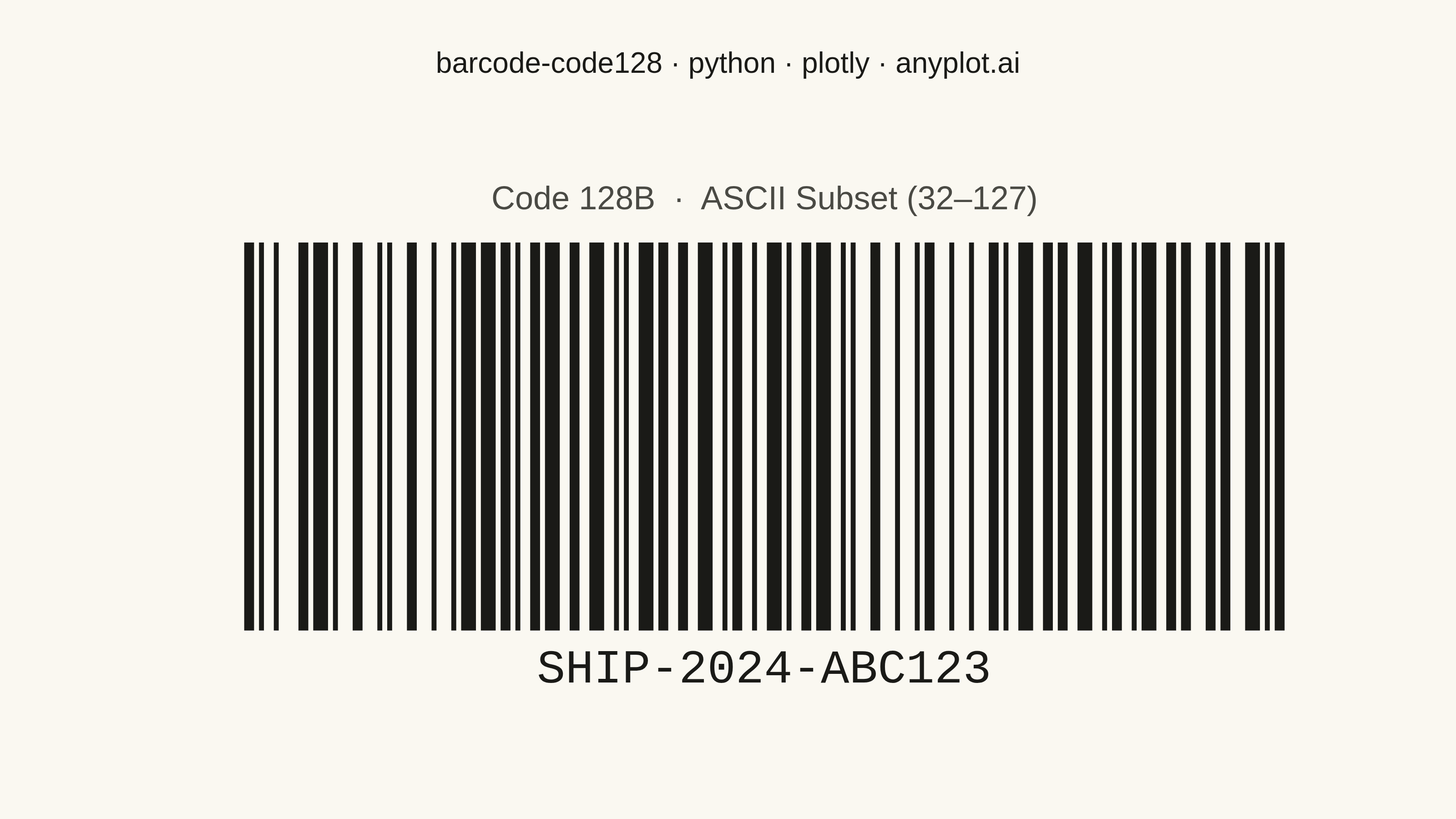
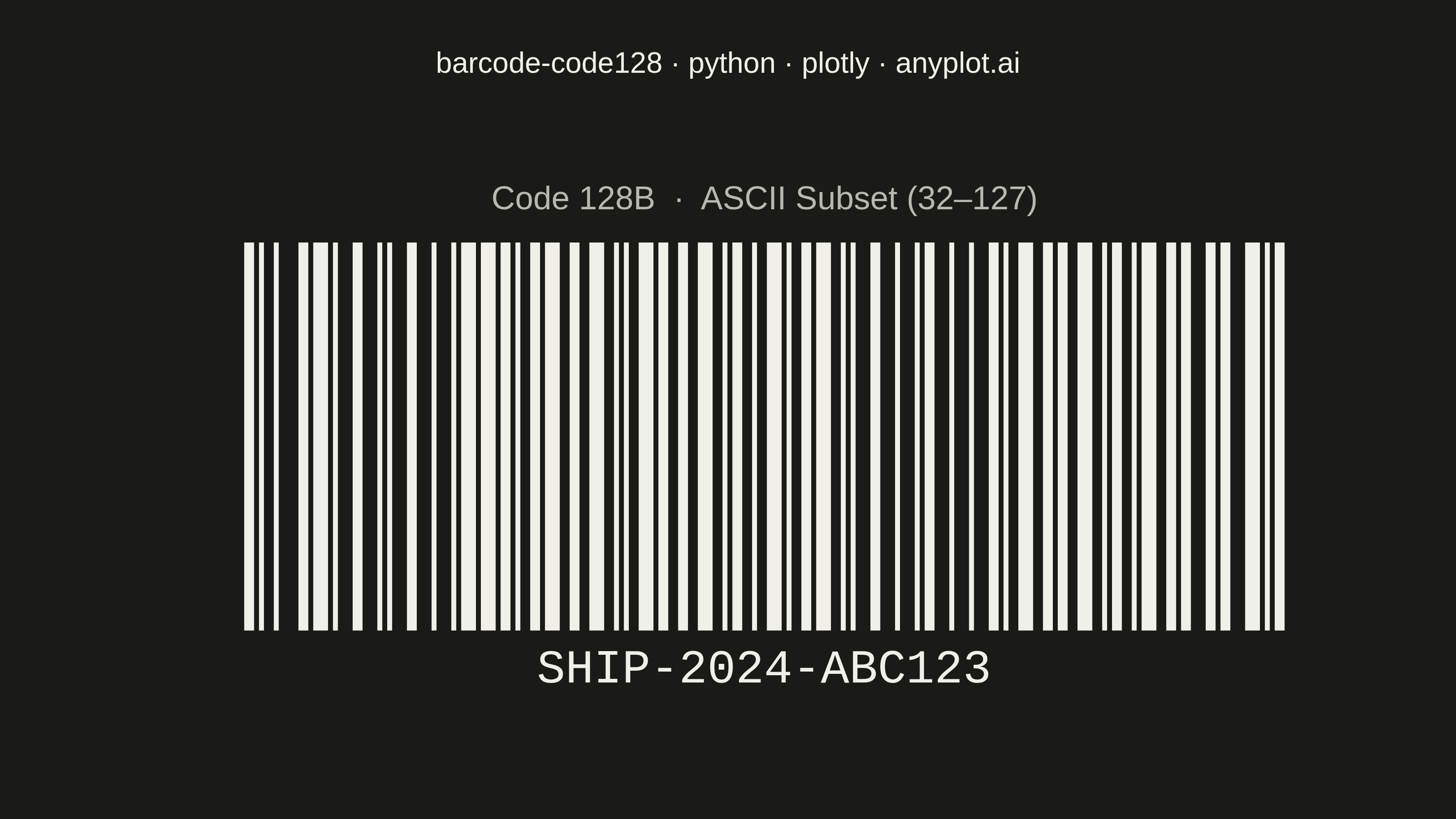
A Code 128 barcode visualization that encodes alphanumeric data into a high-density linear barcode pattern. Code 128 is a widely-used 1D barcode format that supports the full 128 ASCII character set, with three code subsets (A, B, C) that can be switched dynamically for optimal encoding efficiency. This visualization generates scannable barcodes commonly found on shipping labels, industrial parts, and healthcare specimens.
""" anyplot.ai
barcode-code128: Code 128 Barcode
Library: plotly 6.7.0 | Python 3.13.13
Quality: 94/100 | Updated: 2026-05-21
"""

import os

import plotly.graph_objects as go


# Theme tokens
THEME = os.getenv("ANYPLOT_THEME", "light")
PAGE_BG = "#FAF8F1" if THEME == "light" else "#1A1A17"
INK = "#1A1A17" if THEME == "light" else "#F0EFE8"
INK_SOFT = "#4A4A44" if THEME == "light" else "#B8B7B0"

# Code 128 encoding patterns (11-module per symbol; STOP is 13 modules)
CODE128_PATTERNS = {
    "START_A": "11010000100",
    "START_B": "11010010000",
    "START_C": "11010011100",
    "STOP": "1100011101011",
    0: "11011001100",
    1: "11001101100",
    2: "11001100110",
    3: "10010011000",
    4: "10010001100",
    5: "10001001100",
    6: "10011001000",
    7: "10011000100",
    8: "10001100100",
    9: "11001001000",
    10: "11001000100",
    11: "11000100100",
    12: "10110011100",
    13: "10011011100",
    14: "10011001110",
    15: "10111001100",
    16: "10011101100",
    17: "10011100110",
    18: "11001110010",
    19: "11001011100",
    20: "11001001110",
    21: "11011100100",
    22: "11001110100",
    23: "11101101110",
    24: "11101001100",
    25: "11100101100",
    26: "11100100110",
    27: "11101100100",
    28: "11100110100",
    29: "11100110010",
    30: "11011011000",
    31: "11011000110",
    32: "11000110110",
    33: "10100011000",
    34: "10001011000",
    35: "10001000110",
    36: "10110001000",
    37: "10001101000",
    38: "10001100010",
    39: "11010001000",
    40: "11000101000",
    41: "11000100010",
    42: "10110111000",
    43: "10110001110",
    44: "10001101110",
    45: "10111011000",
    46: "10111000110",
    47: "10001110110",
    48: "11101110110",
    49: "11010001110",
    50: "11000101110",
    51: "11011101000",
    52: "11011100010",
    53: "11011101110",
    54: "11101011000",
    55: "11101000110",
    56: "11100010110",
    57: "11101101000",
    58: "11101100010",
    59: "11100011010",
    60: "11101111010",
    61: "11001000010",
    62: "11110001010",
    63: "10100110000",
    64: "10100001100",
    65: "10010110000",
    66: "10010000110",
    67: "10000101100",
    68: "10000100110",
    69: "10110010000",
    70: "10110000100",
    71: "10011010000",
    72: "10011000010",
    73: "10000110100",
    74: "10000110010",
    75: "11000010010",
    76: "11001010000",
    77: "11110111010",
    78: "11000010100",
    79: "10001111010",
    80: "10100111100",
    81: "10010111100",
    82: "10010011110",
    83: "10111100100",
    84: "10011110100",
    85: "10011110010",
    86: "11110100100",
    87: "11110010100",
    88: "11110010010",
    89: "11011011110",
    90: "11011110110",
    91: "11110110110",
    92: "10101111000",
    93: "10100011110",
    94: "10001011110",
    95: "10111101000",
    96: "10111100010",
    97: "11110101000",
    98: "11110100010",
    99: "10111011110",
    100: "10111101110",
    101: "11101011110",
    102: "11110101110",
    103: "11010000100",
    104: "11010010000",
    105: "11010011100",
    106: "1100011101011",
}

# Code 128B: ASCII 32-127 mapped to values 0-95
CODE128B_MAP = {chr(i): i - 32 for i in range(32, 128)}

# Data — shipping tracking code (Code 128B subset covers full alphanumeric range)
content = "SHIP-2024-ABC123"

# Encode using Code 128B subset
values = [104]  # START_B
for char in content:
    values.append(CODE128B_MAP.get(char, 0))

# Check digit: modulo 103 algorithm (mandatory per spec)
checksum = values[0]
for i, val in enumerate(values[1:], 1):
    checksum += i * val
checksum = checksum % 103
values.append(checksum)

# Build binary pattern: START_B + data symbols + check digit + STOP
barcode_pattern = CODE128_PATTERNS["START_B"]
for val in values[1:-1]:
    barcode_pattern += CODE128_PATTERNS[val]
barcode_pattern += CODE128_PATTERNS[values[-1]]
barcode_pattern += CODE128_PATTERNS["STOP"]

# Calculate bar positions and widths from binary pattern
QUIET_ZONE = 80  # generous quiet zone for reliable scanning
MODULE_W = 4  # data units per module
x_positions = []
bar_widths_list = []
current_x = QUIET_ZONE

for i, bit in enumerate(barcode_pattern):
    if bit == "1":
        if i == 0 or barcode_pattern[i - 1] == "0":
            width = MODULE_W
            j = i + 1
            while j < len(barcode_pattern) and barcode_pattern[j] == "1":
                width += MODULE_W
                j += 1
            x_positions.append(current_x + width / 2)
            bar_widths_list.append(width)
    current_x += MODULE_W

total_width = QUIET_ZONE + len(barcode_pattern) * MODULE_W + QUIET_ZONE

# Structural region boundaries in x coordinates (modules: START=11, each char=11, STOP=13)
START_X0 = QUIET_ZONE
START_X1 = QUIET_ZONE + 11 * MODULE_W

data_start_x = START_X1
data_end_x = data_start_x + len(content) * 11 * MODULE_W

check_x0 = data_end_x
check_x1 = check_x0 + 11 * MODULE_W

stop_x0 = check_x1
stop_x1 = stop_x0 + 13 * MODULE_W

# Plot
fig = go.Figure()

BAR_Y0 = 90
BAR_Y1 = 510
mid_bar_y = (BAR_Y0 + BAR_Y1) / 2

# Barcode bars — tall to utilize canvas space
for x, w in zip(x_positions, bar_widths_list, strict=True):
    fig.add_shape(type="rect", x0=x - w / 2, x1=x + w / 2, y0=BAR_Y0, y1=BAR_Y1, fillcolor=INK, line={"width": 0})

# --- Structural anatomy annotations ---
# Horizontal bracket line spanning the full barcode (above bars)
BRACKET_Y = BAR_Y1 + 14
fig.add_shape(
    type="line", x0=START_X0, x1=stop_x1, y0=BRACKET_Y, y1=BRACKET_Y, line={"color": INK_SOFT, "width": 1}, opacity=0.55
)

# Vertical tick marks at each region boundary
for bx in [START_X0, START_X1, data_end_x, check_x1, stop_x1]:
    fig.add_shape(
        type="line",
        x0=bx,
        x1=bx,
        y0=BRACKET_Y - 6,
        y1=BRACKET_Y + 6,
        line={"color": INK_SOFT, "width": 1},
        opacity=0.55,
    )

# Region labels just above the bracket line (narrow regions use smaller font)
LABEL_Y = BRACKET_Y + 10
for x0, x1, label, fsize in [
    (START_X0, START_X1, "START B", 10),
    (data_start_x, data_end_x, f"DATA  ({len(content)} chars)", 11),
    (check_x0, check_x1, "CHK", 10),
    (stop_x0, stop_x1, "STOP", 10),
]:
    fig.add_annotation(
        x=(x0 + x1) / 2,
        y=LABEL_Y,
        text=label,
        showarrow=False,
        font={"size": fsize, "color": INK_SOFT},
        xanchor="center",
        yanchor="bottom",
    )

# --- Hover interactivity (distinctive plotly feature) ---
# Per-character data hover points — reveals encoded value for each character
char_xs = [data_start_x + (i * 11 + 5.5) * MODULE_W for i in range(len(content))]
char_labels = [
    f"<b>'{char}'</b>  ·  Code 128B value: {val}<br>Position {i + 1} / {len(content)}"
    for i, (char, val) in enumerate(zip(content, values[1:-1], strict=False))
]
fig.add_trace(
    go.Scatter(
        x=char_xs,
        y=[mid_bar_y] * len(char_xs),
        mode="markers",
        marker={"opacity": 0, "size": 30, "color": INK},
        text=char_labels,
        hovertemplate="%{text}<extra></extra>",
        showlegend=False,
        hoverlabel={"bgcolor": PAGE_BG, "bordercolor": INK_SOFT, "font": {"color": INK, "size": 13}},
    )
)

# Structural region hover points
for cx, hover_text in [
    ((START_X0 + START_X1) / 2, "<b>START B Pattern</b><br>Signals Code 128 subset B (ASCII 32–127)<br>11 modules"),
    ((check_x0 + check_x1) / 2, f"<b>Check Digit: {checksum}</b><br>Modulo 103 of weighted symbol sum<br>11 modules"),
    ((stop_x0 + stop_x1) / 2, "<b>STOP Pattern</b><br>Terminates every Code 128 barcode<br>13 modules"),
]:
    fig.add_trace(
        go.Scatter(
            x=[cx],
            y=[mid_bar_y],
            mode="markers",
            marker={"opacity": 0, "size": 20},
            hovertemplate=f"{hover_text}<extra></extra>",
            showlegend=False,
            hoverlabel={"bgcolor": PAGE_BG, "bordercolor": INK_SOFT, "font": {"color": INK, "size": 13}},
        )
    )

# Human-readable text below barcode
fig.add_annotation(
    x=total_width / 2,
    y=45,
    text=content,
    showarrow=False,
    font={"size": 26, "family": "Courier New, monospace", "color": INK},
    xanchor="center",
    yanchor="middle",
)

# Subset label above anatomy bracket
fig.add_annotation(
    x=total_width / 2,
    y=600,
    text="Code 128B  ·  ASCII Subset (32–127)",
    showarrow=False,
    font={"size": 18, "color": INK_SOFT},
    xanchor="center",
    yanchor="middle",
)

# Layout
fig.update_layout(
    autosize=False,
    title={
        "text": "barcode-code128 · python · plotly · anyplot.ai",
        "font": {"size": 16, "color": INK},
        "x": 0.5,
        "xanchor": "center",
    },
    xaxis={"visible": False, "range": [0, total_width], "fixedrange": True},
    yaxis={"visible": False, "range": [0, 650], "fixedrange": True},
    plot_bgcolor=PAGE_BG,
    paper_bgcolor=PAGE_BG,
    margin={"l": 80, "r": 40, "t": 80, "b": 60},
    showlegend=False,
)

# Save
fig.write_image(f"plot-{THEME}.png", width=800, height=450, scale=4)
fig.write_html(f"plot-{THEME}.html", include_plotlyjs="cdn")
Runnable source as JSON, for any HTTP client: https://api.anyplot.ai/specs/barcode-code128/plotly/code. Any spec id and library id listed in llms-full.txt fit the same URL shape; every URL below is complete and callable.
{
  "spec_id": "barcode-code128",
  "language": "python",
  "library": "plotly",
  "page": "https://anyplot.ai/barcode-code128/python/plotly",
  "hub": "https://anyplot.ai/barcode-code128",
  "code_json": "https://api.anyplot.ai/specs/barcode-code128/plotly/code",
  "spec_json": "https://api.anyplot.ai/specs/barcode-code128",
  "render_light_png": "https://storage.googleapis.com/anyplot-images/plots/barcode-code128/python/plotly/plot-light.png",
  "render_dark_png": "https://storage.googleapis.com/anyplot-images/plots/barcode-code128/python/plotly/plot-dark.png",
  "interactive_light_html": "https://storage.googleapis.com/anyplot-images/plots/barcode-code128/python/plotly/plot-light.html",
  "interactive_dark_html": "https://storage.googleapis.com/anyplot-images/plots/barcode-code128/python/plotly/plot-dark.html",
  "quality_score": 94.0,
  "license": "MIT",
  "guide": "https://anyplot.ai/llms.txt"
}
Part of Code 128 Barcode on anyplot.ai.