The same plot in 14 other libraries — JavaScript: Chart.js, Apache ECharts, Highcharts, MUI X Charts; Python: Altair, Bokeh, lets-plot, Matplotlib, Plotly, plotnine, Pygal, Seaborn; R: ggplot2; Julia: Makie.jl. Compare all 15 side by side: Hierarchical Network Graph with Tree Layout in Python, R, Julia and JavaScript.
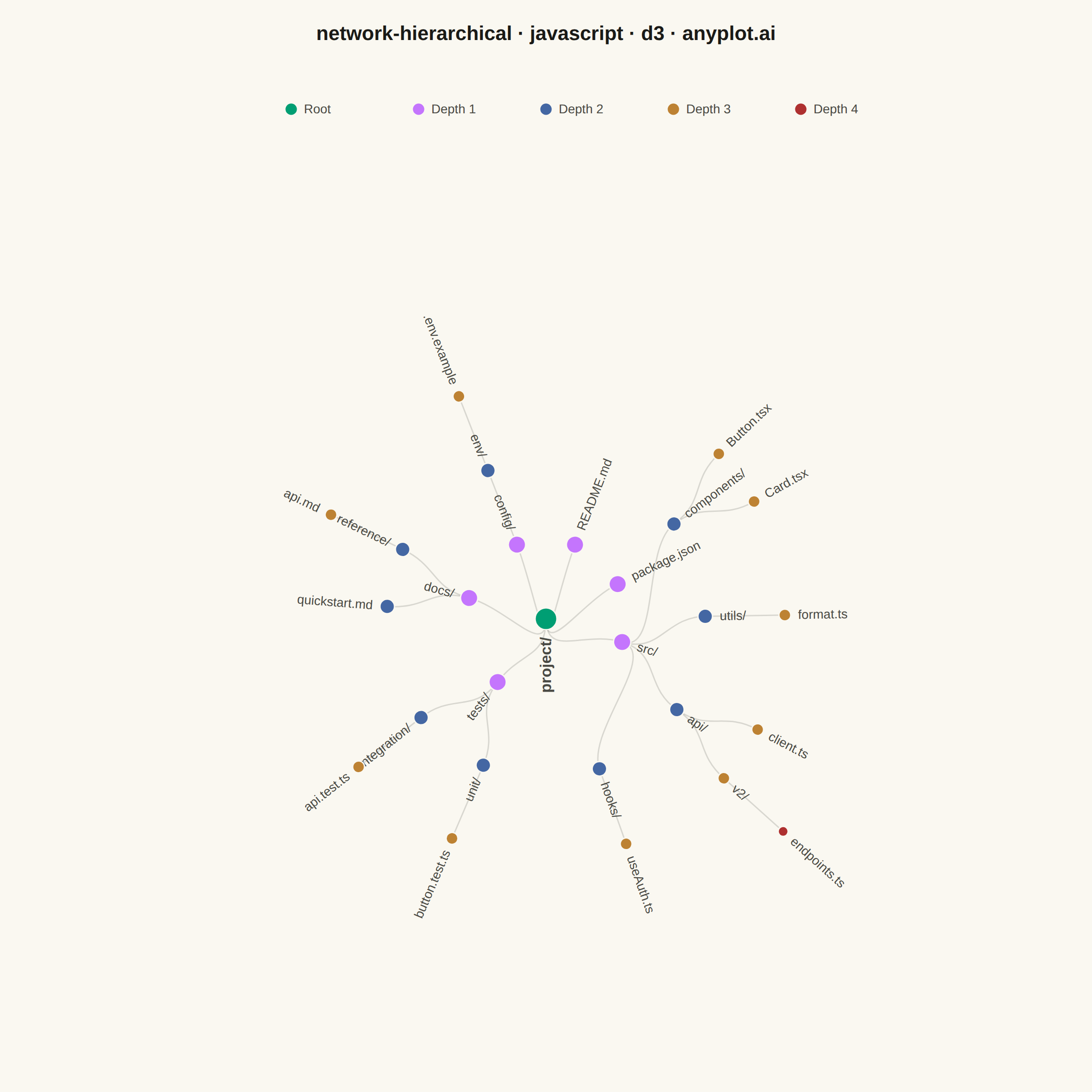
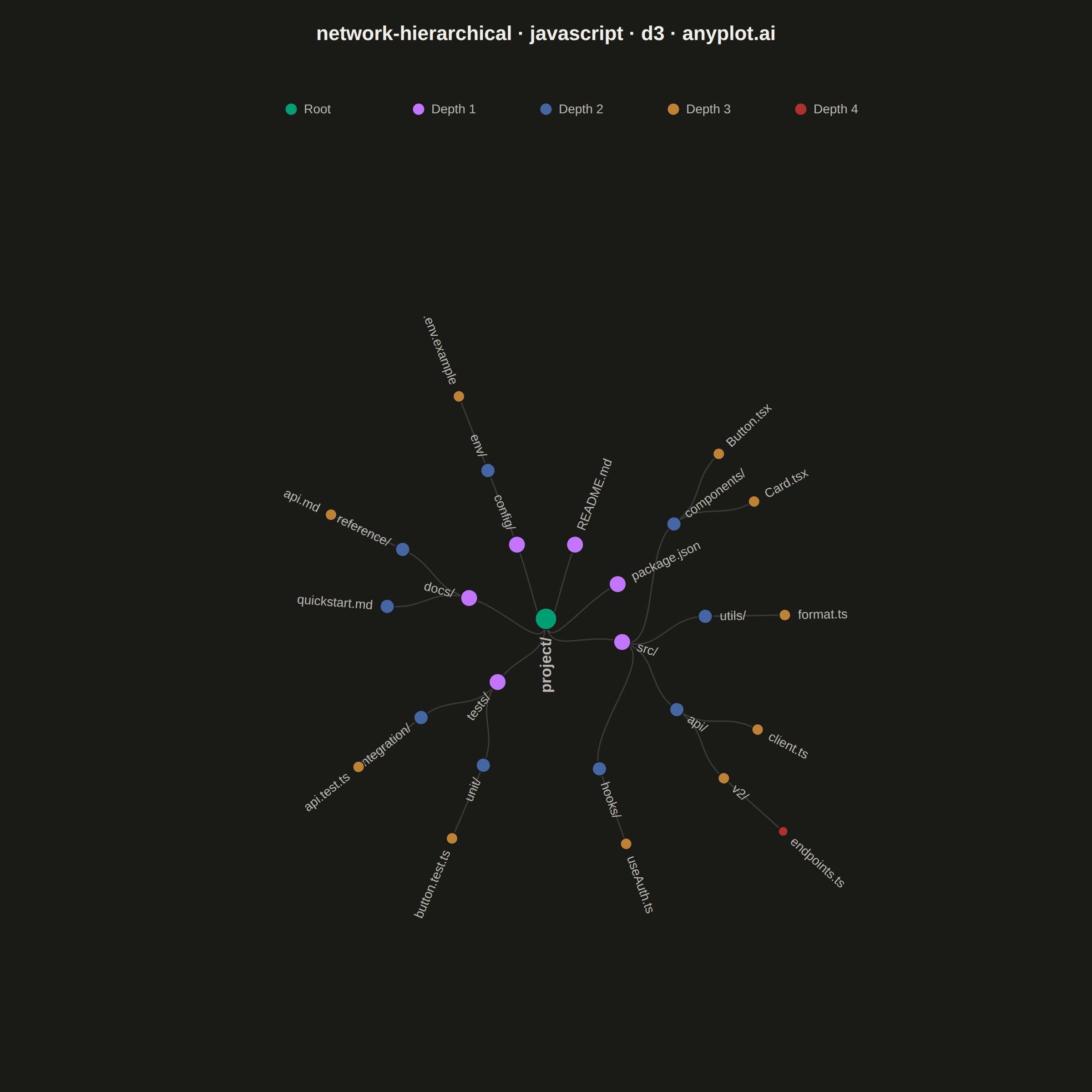
A hierarchical network graph organizes nodes in distinct levels from root to leaves, with edges showing parent-child relationships between levels. Unlike force-directed layouts that optimize for aesthetic spacing, hierarchical layouts explicitly encode tree structure by positioning nodes at fixed vertical or horizontal levels. This visualization reveals organizational depth, branching patterns, and the overall tree structure at a glance.
// anyplot.ai
// network-hierarchical: Hierarchical Network Graph with Tree Layout
// Library: d3 7.9.0 | JavaScript 22.23.2
// Quality: 91/100 | Created: 2026-09-02

//# anyplot-orientation: square
const t = window.ANYPLOT_TOKENS;
const { width, height } = window.ANYPLOT_SIZE;

// --- Data: a repository directory tree, root -> file leaves at varying depths
const projectTree = {
  name: "project/",
  children: [
    { name: "README.md" },
    { name: "package.json" },
    {
      name: "src/",
      children: [
        { name: "components/", children: [{ name: "Button.tsx" }, { name: "Card.tsx" }] },
        { name: "utils/", children: [{ name: "format.ts" }] },
        {
          name: "api/",
          children: [{ name: "client.ts" }, { name: "v2/", children: [{ name: "endpoints.ts" }] }],
        },
        { name: "hooks/", children: [{ name: "useAuth.ts" }] },
      ],
    },
    {
      name: "tests/",
      children: [
        { name: "unit/", children: [{ name: "button.test.ts" }] },
        { name: "integration/", children: [{ name: "api.test.ts" }] },
      ],
    },
    {
      name: "docs/",
      children: [
        { name: "quickstart.md" },
        { name: "reference/", children: [{ name: "api.md" }] },
      ],
    },
    { name: "config/", children: [{ name: "env/", children: [{ name: ".env.example" }] }] },
  ],
};

// --- Layout: radial tree — angle spreads siblings around a full circle,
// radius directly encodes depth, giving leaf labels far more room than a
// linear column and making organizational depth read at a glance ----------
const root = d3.hierarchy(projectTree);
const maxDepth = d3.max(root.descendants(), (d) => d.depth);

const titleZone = 190; // title + horizontal legend row
const bottomMargin = 30;
const availableHeight = height - titleZone - bottomMargin;
const labelPadding = 140; // room for outward-pointing leaf labels
const maxRadius = Math.min(width, availableHeight) / 2 - labelPadding;
const cx = width / 2;
const cy = titleZone + availableHeight / 2;

const treeLayout = d3
  .tree()
  .size([2 * Math.PI, maxRadius])
  .separation((a, b) => (a.parent === b.parent ? 1 : 2) / a.depth);
treeLayout(root);

const svg = d3.select("#container").append("svg").attr("width", width).attr("height", height);
const g = svg.append("g").attr("transform", `translate(${cx},${cy})`);

// --- Edges: radial parent-child links, no arrows ----------------------------
const linkGen = d3.linkRadial().angle((d) => d.x).radius((d) => d.y);

g.selectAll("path.link")
  .data(root.links())
  .join("path")
  .attr("class", "link")
  .attr("d", linkGen)
  .attr("fill", "none")
  .attr("stroke", t.grid)
  .attr("stroke-width", 1.5);

// --- Nodes: one categorical color per depth level (root always palette[0]) --
const depthColor = (depth) => t.palette[Math.min(depth, t.palette.length - 1)];
const depthRadius = (depth) => [12, 9.5, 8, 6.5, 5.5][Math.min(depth, 4)];

const node = g
  .selectAll("g.node")
  .data(root.descendants())
  .join("g")
  .attr("class", "node")
  .attr("transform", (d) => `rotate(${(d.x * 180) / Math.PI - 90}) translate(${d.y},0)`);

node
  .append("circle")
  .attr("r", (d) => depthRadius(d.depth))
  .attr("fill", (d) => depthColor(d.depth))
  .attr("stroke", t.pageBg)
  .attr("stroke-width", 1.5);

node
  .append("text")
  .attr("x", (d) => (d.x < Math.PI ? 1 : -1) * (depthRadius(d.depth) + 8))
  .attr("dy", "0.32em")
  .attr("text-anchor", (d) => (d.x < Math.PI ? "start" : "end"))
  .attr("transform", (d) => (d.x >= Math.PI ? "rotate(180)" : null))
  .attr("fill", t.inkSoft)
  .style("font-size", (d) => (d.depth === 0 ? "17px" : "14px"))
  .style("font-weight", (d) => (d.depth === 0 ? "600" : "400"))
  .text((d) => d.data.name);

// --- Legend: depth level meaning, one row under the title -------------------
const legendData = d3.range(maxDepth + 1).map((depth) => ({
  depth,
  label: depth === 0 ? "Root" : `Depth ${depth}`,
}));
const legendItemWidth = 140;
const legendY = 120;
const legendStartX = width / 2 - (legendData.length * legendItemWidth) / 2 + legendItemWidth / 2;

const legend = svg.append("g");
legendData.forEach((d, i) => {
  const gx = legendStartX + i * legendItemWidth;
  legend
    .append("circle")
    .attr("cx", gx)
    .attr("cy", legendY)
    .attr("r", 7)
    .attr("fill", depthColor(d.depth))
    .attr("stroke", t.pageBg)
    .attr("stroke-width", 1.5);
  legend
    .append("text")
    .attr("x", gx + 14)
    .attr("y", legendY)
    .attr("dy", "0.32em")
    .attr("fill", t.inkSoft)
    .style("font-size", "14px")
    .text(d.label);
});

// --- Title --------------------------------------------------------------
svg
  .append("text")
  .attr("x", width / 2)
  .attr("y", 44)
  .attr("text-anchor", "middle")
  .attr("fill", t.ink)
  .style("font-size", "22px")
  .style("font-weight", "600")
  .text("network-hierarchical · javascript · d3 · anyplot.ai");
Runnable source as JSON, for any HTTP client: https://api.anyplot.ai/specs/network-hierarchical/d3/code. Any spec id and library id listed in llms-full.txt fit the same URL shape; every URL below is complete and callable.
{
  "spec_id": "network-hierarchical",
  "language": "javascript",
  "library": "d3",
  "page": "https://anyplot.ai/network-hierarchical/javascript/d3",
  "hub": "https://anyplot.ai/network-hierarchical",
  "code_json": "https://api.anyplot.ai/specs/network-hierarchical/d3/code",
  "spec_json": "https://api.anyplot.ai/specs/network-hierarchical",
  "render_light_png": "https://storage.googleapis.com/anyplot-images/plots/network-hierarchical/javascript/d3/plot-light.png",
  "render_dark_png": "https://storage.googleapis.com/anyplot-images/plots/network-hierarchical/javascript/d3/plot-dark.png",
  "interactive_light_html": "https://storage.googleapis.com/anyplot-images/plots/network-hierarchical/javascript/d3/plot-light.html",
  "interactive_dark_html": "https://storage.googleapis.com/anyplot-images/plots/network-hierarchical/javascript/d3/plot-dark.html",
  "quality_score": 91.0,
  "license": "MIT",
  "guide": "https://anyplot.ai/llms.txt"
}
Part of Hierarchical Network Graph with Tree Layout on anyplot.ai.